HilliTech's Newsletter: Apple Health, now with AI
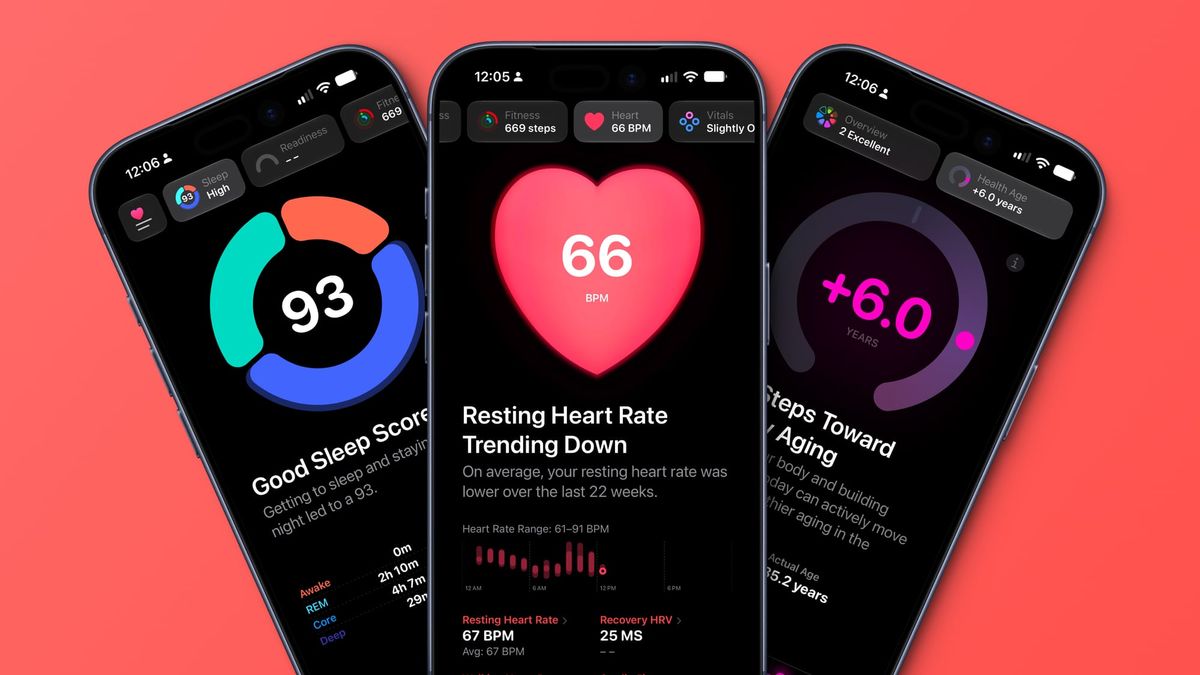
Apple's new approach to the Health app may be just what the database tool needs, even if it has a sprinkle of AI on top. Unlike the AI grifters asking to suck up your health data and spit out nonsense, Apple's approach seems to actually work.
Apple Health puts AI in its place
I know that some of you feel like AI is an abomination that should be sent straight to the Shadow Realm, and in most cases, you're right. The AI grifters at the head of several technology companies overpromised on what this technology is, what it can do, and worst of all, made the planet worse as a result.
I won't get into how Apple's approach to AI is different here today. I've spilled enough ink on the subject, and you're free to catch up on my exact feelings on the technology and where Apple lies in it here.
To put it simply, Apple appears to be meeting users where they are in providing useful tools powered by on-device intelligence, only going to Private Cloud Compute when needed, and focusing on sane, safe, private, and personal AI features.
That strategy has emerged yet again thanks to Apple Health getting a redesign and some Apple Intelligence features. No, Apple isn't going to train on your health data – it never has and never will. Nor will Apple be digesting all of your data to spit out some idiotic worthless value that can change on every refresh like ChatGPT does.
Instead, Apple Intelligence barely makes an appearance in Apple Health, though it is there. Apple has implemented AI as a way to gather and analyze the mountains of data in Apple Health to help create trend lines and surface useful data points.
The key: all of the data Apple Health shows you is your data, organized and prioritized by Apple Intelligence. It isn't making up some grade or generating charts with hallucinated values. It's just your health, organized.
Apple Intelligence also plays a role in creating your assessment data via video capture. Various assessments for movement, fitness, and other metrics can be performed in the new Longevity tab, and AI will analyze your performance to give you scores based on Apple's available data for comparison.
I see these features all as an evolution of what we were already doing with machine learning, it is just better. Yes, AI is capable of making silly mistakes, but by giving it deterministic outputs and not allowing it to just say and do what it wants, it eliminates a lot of the potential issues.
That's what I find most interesting about Apple Health and its use of Apple Intelligence. The parts of Apple Intelligence and Siri AI that work the best are the ones where the endpoint isn't some randomized output or concept.
Image Playgrounds, text generation, and pretty much any "generative" AI tool will always be somewhat sloppy and produce poorly realized results. These are the tools people tend to reject the most when discussing "AI."
However, look at how Siri AI answers a question. It pulls data with direct quotes with links to the source, rather than answering sycophantically and erroneously. Of course, Siri AI is capable of making mistakes and providing a poorly sourced answer, but that isn't unique to that tool. I just appreciate that Apple minimizes its chances of messing up by having it directly quote source material.
Apple Health takes a similar, if more specific approach. Apple Intelligence never diagnoses you or tells you some generated information. Instead, it uses all of the available data to arrive at an endpoint, whether that's an article or video produced by a human. The human doctor describes why you need more fruit in your diet, or why walking more will help you age better.
The feature is still in beta, so not everything is available. I expect we'll see more videos, articles, and assessments going forward. This was going to be a paid "Health+" service, but Apple apparently decided against it, instead rolling it out as a core feature of Apple Health. Much of it is "paid" though, as you'll need the latest and greatest Apple Watch models to get every feature.
My Apple Health journey
When I was in the Navy, I kept up with my health fairly well. I didn't eat the best, and I did drink alcohol regularly, so it wasn't as if I was a pristine image of health. However, I could do plenty of push-ups and run a mile and a half in under 13 minutes. It was enough.
Apple Fitness+ launched and I gave it a shot in 2020, but it didn't stick. I had just separated from the military, and a regimented fitness video program felt a little too close to what I had just escaped.
However, like when Apple Watch first launched, I am aware of the many success stories of "Apple helped me get healthy." It is inspiring.
In 2025 I decided to get back into a good fitness routine, and it went great for a few months, then I injured my knee terribly. Don't worry, I'm okay, but it was some silly thing coming back to haunt me from my time in the Navy.
Anyway, this threw me off, and I haven't quite gotten back to a proper routine since. I love working out, and I did feel amazing the few months I managed a routine before. Now, Apple Health's redesign has offered me another motivational entry point.
I think this is very much a Tim Cook legacy moment. Sure, he stepped down as CEO a few weeks before the new Apple Watches and Apple Health were revealed, but they have his health push written all over it. I expect the new Apple Health systems will result in yet another wave of "Apple Health changed my life."
My interest is peaked, so I may even join in that chorus. I will be taking all of the assessments, getting my labs done, and trying out what Apple Health recommends. So far, I've got the usual common sense stuff: take more steps during the day, include more fruit in your diet, and get a fitness routine going.
The thing is, we all should know what is necessary to be healthy. I didn't need Apple Health to tell me these things. However, quantifying it, displaying it, and showing me what progress I'm making are all great ways to motivate me.
I'm going to ease back into a fitness routine, take walks every day, and incorporate more fruits and veggies into my diet starting this week. I'm happy with my weight, but suffer from the same "I could lose 10 pounds" many Americans do. This is more about overall health, my heart, my cholesterol, and my readiness levels than hitting some arbitrary weight goal.
My annual theme for 2026 was reorganization, which still applies I think. Given that we moved into a new home and iPhone Duo is my device of choice, there is plenty of reorganization in my year already. Apple Health pushing me into new healthy choices and returning me to a fitness routine is a kind of reorganization on its own.
I think it will be interesting to see how Apple Health evolves over the next year and what useful tidbits I can gain from it. I wonder how it might react and show my progress as I implement these changes and if there will be notable improvements in some metrics over time. This is a test that will benefit me, so I'm happy to take it.
Apple Health's database oddities
I am a database lover. Give me an empty database and I see possibilities. It is one reason why I am such a fan of an app like Apple Contacts. Sure, it's a basic necessity for organizing known contact info, but it was formerly the sole place you could train Siri and your iPhone about your personal life. Now, everything programs on-device intelligence, including Contacts.
Apple Health is another database with tons of potential, and I recognized that from the moment the Apple Watch launched. I've always been interested in trying to find the simplest ways to track every minute detail available in Apple Health. However, even after a decade with the app, very little has emerged in some of the edge case metrics.
For example, you can track your UV Index exposure as a metric. You log the time you were in the sun and the UV Index during that time and hit save. No human person will ever do this manually. Though, you'd think since Apple Watch already logs Time in Daylight automatically, that it would just log UV Index using the weather data available for that location. Nope.
Go into the App Store and you'll find a few apps that claims to do this. They all want your location data and a bunch of money to do this seemingly very simple task. Several are filled with AI-generated images of people getting tans. It's not great.
Developers, I'm giving you a freebie here. Go vibe code it in an afternoon and charge me $2, collect none of my data, and bam, you've got a customer. Collect my recorded Time In Daylight from Apple Health, compare those logs to the UV Index for my Zip Code for those given times, then log that data. Easy, simple.
Why this doesn't already exist, I'll never know.
In order to provide more information for Apple Health, I've ordered a blood pressure cuff and thermometer from iHealth to log those metrics each day. One more set of data points for my database.
There are other outlying health metrics that elude me. I've almost purchased a cheap breathalyzer on a whim several times so I could log my estimated Blood Alcohol Content after an evening of drinking. I'm not aware of any that write to Apple Health, but that's something you can easily enter manually, especially since Apple Health now lets you pin some metrics for easy access.
Then there's the symptoms tab. A lot of this is for helping people track some chronic conditions, like frequent migraines, or is included as a part of cycle tracking.
The thing is, I've never once thought "huh, I have a headache, let's log it." I'm sure there is an app out there that manages this well, and if you know of one that isn't for cycle tracking, I'd be interested in trying it, so let me know.
Maybe that would make a good Action Button or Widget-style Shortcut, activate it to log a symptom and narrow down the list by answering what you're here to log (i.e stomach, skin, sickness, ENT). Something to think up later I suppose.
One last tidbit from me. I'm a cisgender male, so I'm aware how this might sound, but hear me out. If I'm a person that doesn't ovulate, have periods, and will never have the ability to track a cycle, perhaps give me a toggle somewhere to say "hide these options." It should absolutely be shown for everyone automatically by default, especially since not all people who experience these things present as female, but given I'm a database nerd, there's nothing more annoying than an empty table in the database I can't delete. Perhaps the existence of such a toggle could lead to problems I'm not aware of, but it is something I've wondered about.
Also, Apple has a bad habit of ignoring some data in favor of other metrics. Since Apple has never played a direct role in gathering nutritional data, it ignored my years of Foodnoms-logged meals in Apple Health when performing my Nutrition Assessment. Instead, I was asked how often I eat grains, processed foods, and fruit. The whole time I'm just like "don't you know this? It's all right there!"
Yes, the feature is in beta, however, I'm not sure Apple wants to rely on data from external sources, especially when nutrition logging is already fraught with errors. This further reflects my belief that Apple will soon implement meal logging directly into Apple Health using Visual Intelligence. File that in “We’ll see."
Shout out to the Streaks app. I've set it up to help me remember to Journal, read, log meals, drink water, walk, get sunlight, and other metrics. It's a great motivational tool that is easy to check each day and remind me of what I haven't done yet for any given day.
If you know of any other great apps that tie into Apple Health, I'd love to hear about them.
Some housekeeping
Normally, this is where I'd share some links to Aftermath or some other website. I've noticed that basically no one ever clicks on them, so I'm not including them this week as a test. If you are one of the people that enjoy seeing what I link out to, please tell me you miss them.
There is a chance that everyone's email clients are hiding such things from me (good, I hate that there are Ghost analytics at all tbh) and everyone is clicking the links. If so, let me know and I'll bring them back. I love linking out to other places but I won't do it if no one is bothering with them.
As always, thank you for reading my weekly newsletter. If you enjoy what you read here, consider throwing a dollar or two my way via the "Buy Me A Coffee" widget. If you don't see it due to using ad blockers, here's a handy link.